


the latency budget
I think of latency as a budget. That budget is set by product requirements, and every component in your serving stack eats up part of that budget. If you exceed the budget, your user experience begins to degrade:
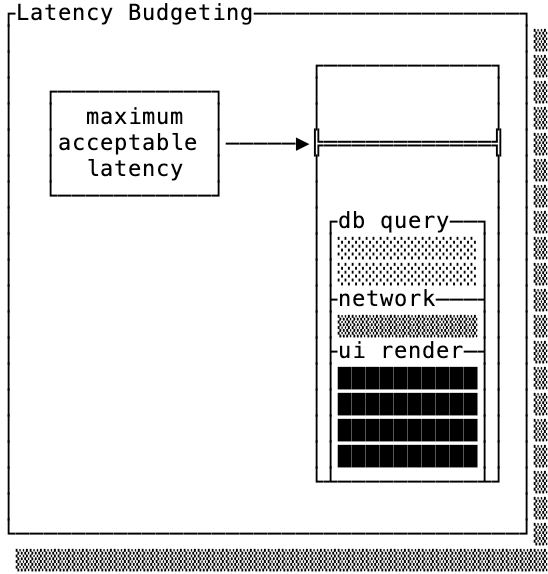
Every product has a different maximum acceptable latency. If you don’t know what your budget is, you can use these numbers as a rough guideline:
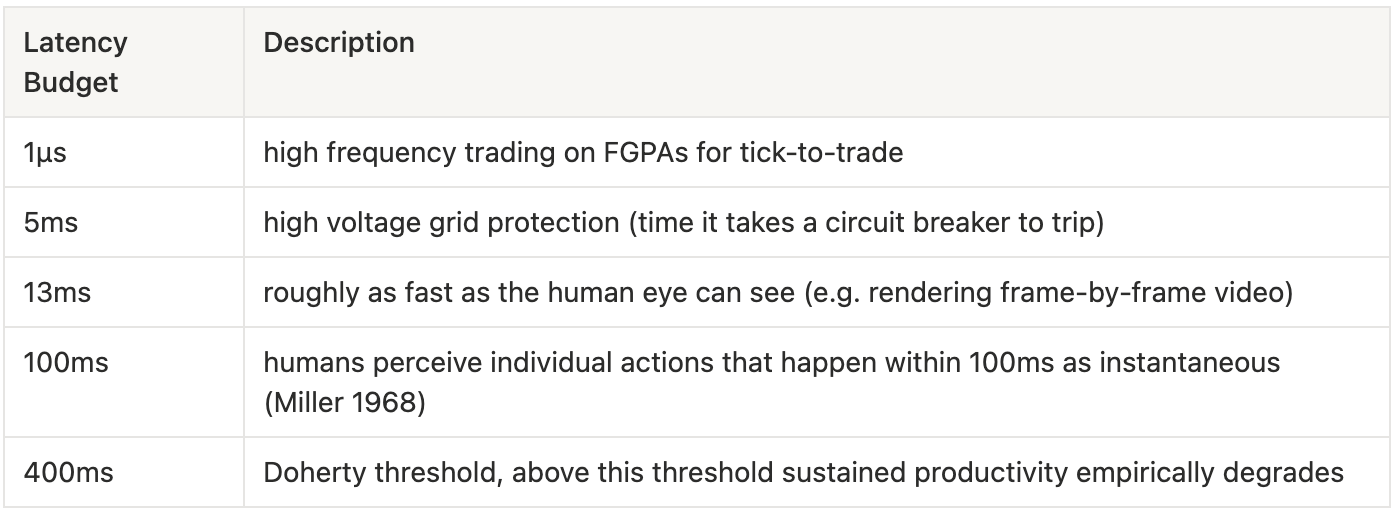
The thing about the latency budget is that you’ve already paid for it. If you don’t use up your budget, you don’t get a refund — if your webpage maximum acceptable latency is 100ms, your customer doesn’t have a meaningfully better experience if you serve it in 50ms.
That makes reducing latency below the acceptable latency a matter of capacity.
little’s law & capacity
Data system costs scale with respect to request throughput, the more requests that come into your database the more hardware is required.
Throughput capacity is the result of dividing average concurrency by the average latency in your system (Little’s Law). As an example, a system that can handle 10 queries simultaneously with average latency of 50ms can handle a throughput of 200 queries/s.
Note that while average latency determines throughput, p99 latency is what eats up your latency budget. For example consider the following scenarios:
100% of your queries take 2ms
99% of your queries take 1ms, but 1% take 100ms
Both of these examples have average latency of 2ms, but if your maximum acceptable latency is 50ms the second is not acceptable.
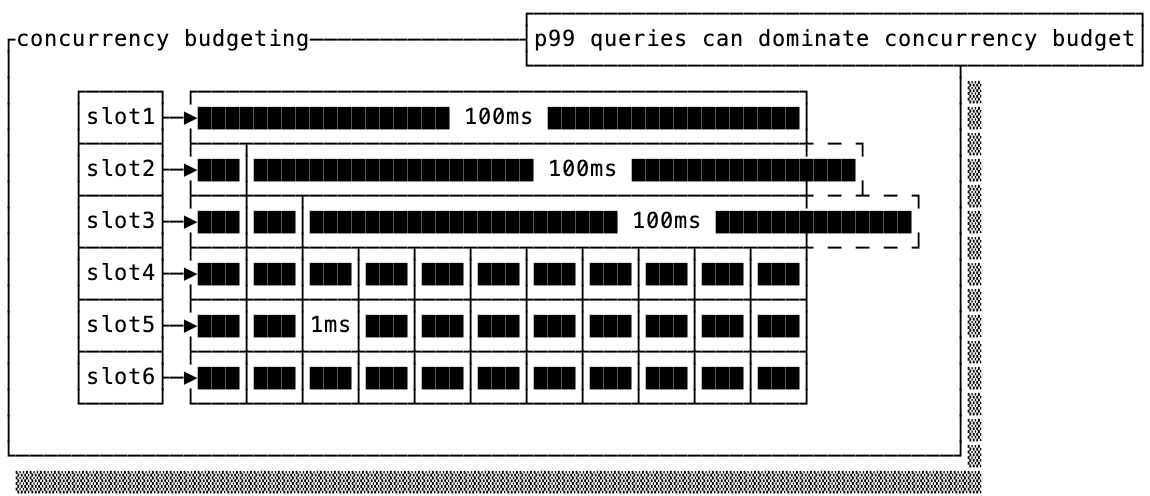
The other consequence of Little’s Law is that there are only two ways you can improve your throughput:
You can reduce the average latency of your requests
You can increase the concurrency your system can handle
You can improve either of these with software optimizations, but if you assume your system is highly optimized then these two are often done by purchasing either faster hardware or more hardware respectively.
the cost of low-latency storage mediums
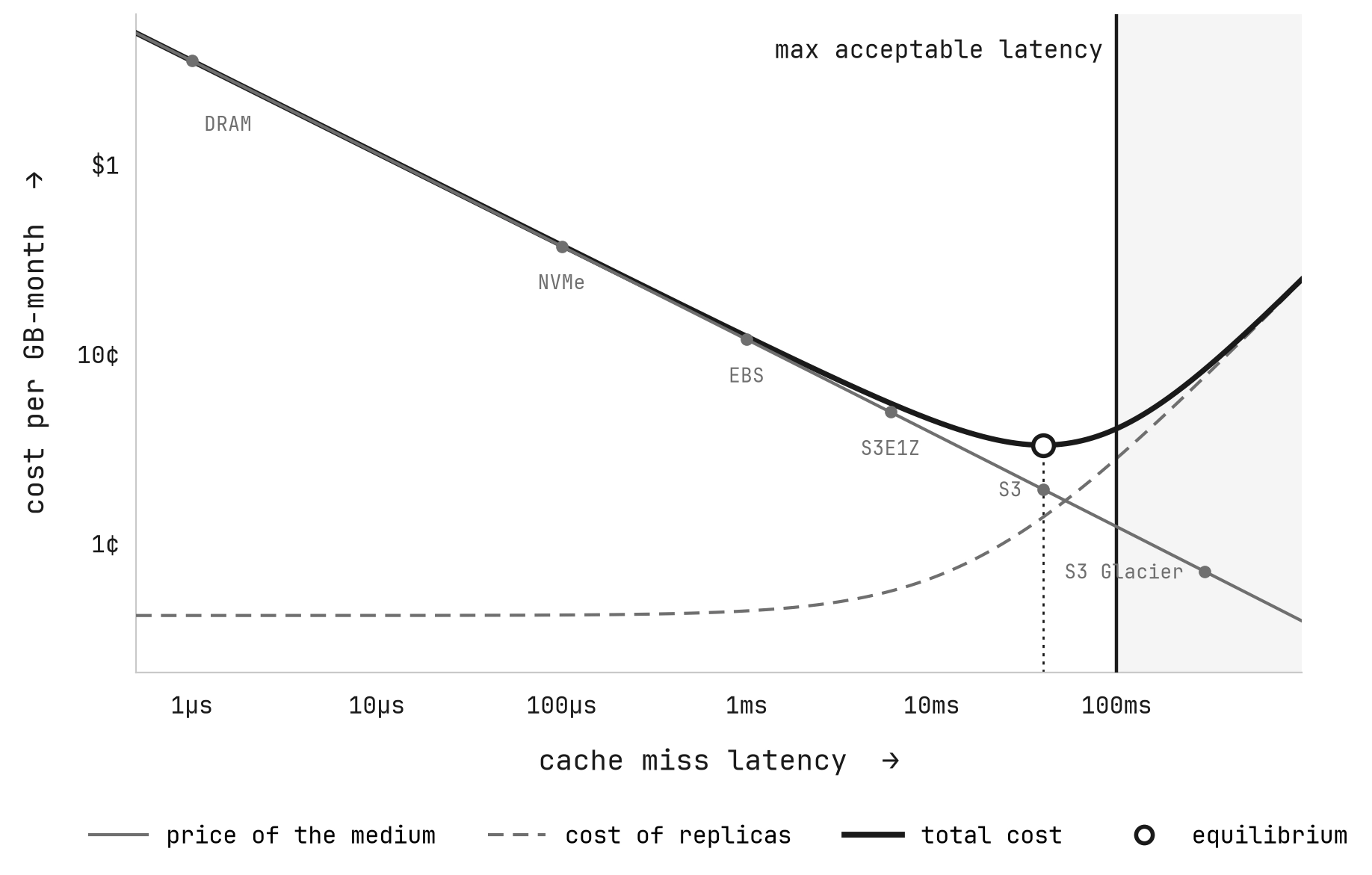
I’m still waiting for storage hardware that can be both cheaper and faster than alternatives. Until that day, paying more for lower latency storage once you’re below your product threshold may not pay off in enough additional capacity.
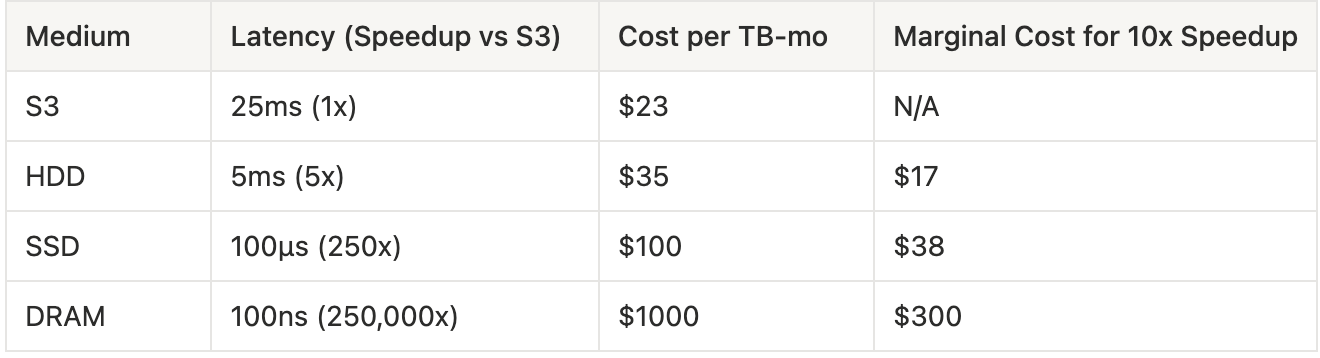
NOTE: this doesn't even consider that S3 includes at least 3-way replication, which makes it even cheaper relatively speaking.
When you mix together this cost function with Little’s law, you can conceptually graph the cost of the additional replicas that you would need to increase concurrency as a result of slower latency against the cost reduction of your storage medium (assuming you are bottle-necked on I/O).
Every product has a different tradeoff depending on the average latencies and available concurrency on a single machine, but some equilibrium exists that dictates which storage medium makes sense for you.
tiers of caches
The previous sections assumed that all of your data was either in CPU cache or on your bulk storage medium. No production data system works like this, instead they tier data to cheaper mediums for less frequently accessed data.
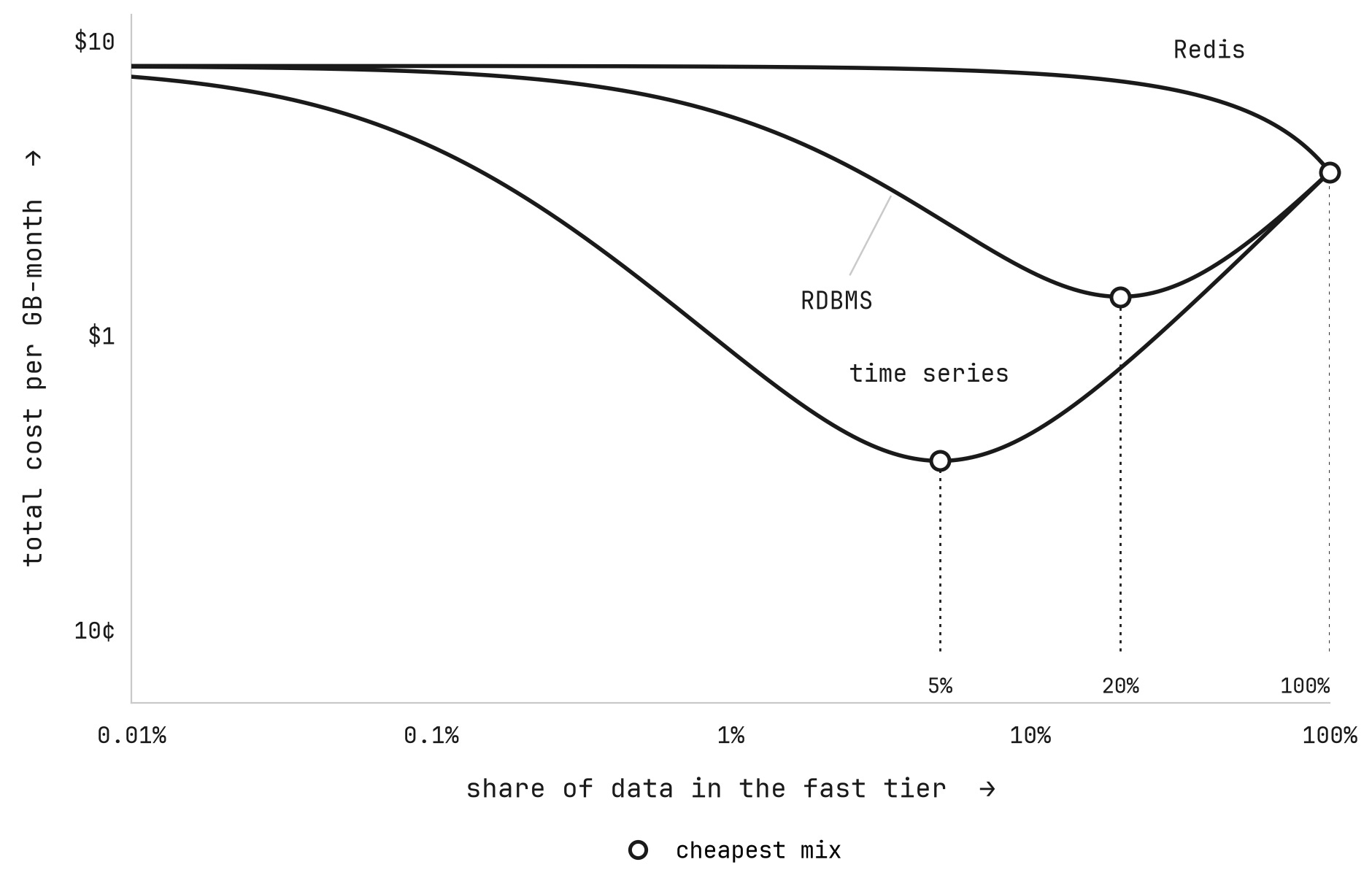
This brings back one of the key observations of Little’s law, which is that average latency is what determines your throughput capacity. If you know that 20% of your data accounts for 80% of your data access, then caching that 20% on more expensive, lower latency storage mediums is well worth the increased cost of storage.
Different use cases have a different optimal caching distribution. Some systems, like Redis, don’t really benefit from caching because they are caches in and of themselves. On the other end of the spectrum systems like time series databases disproportionately read from recent data and make heavy use of caching and cold tiers.
latency tradeoffs (somewhat) unique to S3
I credit this framework to Chris Riccomini, who originally wrote about the latency-cost-durability tradeoff. In short, object store systems are unique in that there is a significant cost to each API request (compared to other storage mediums, that do not charge per request outside of occupying I/O bandwidth).
Write latency is the amount of time it takes you to acknowledge a write to the system. There is some floor to S3 request latency (~25ms), but writing to S3 for every request racks up a large bill. The solution to that is to batch writes together, but you need to wait a certain amount of time to accumulate those writes. This means that if you guarantee durable writes (which you don’t need to if your system is not a system of record) you trade between cost and latency on the write side.
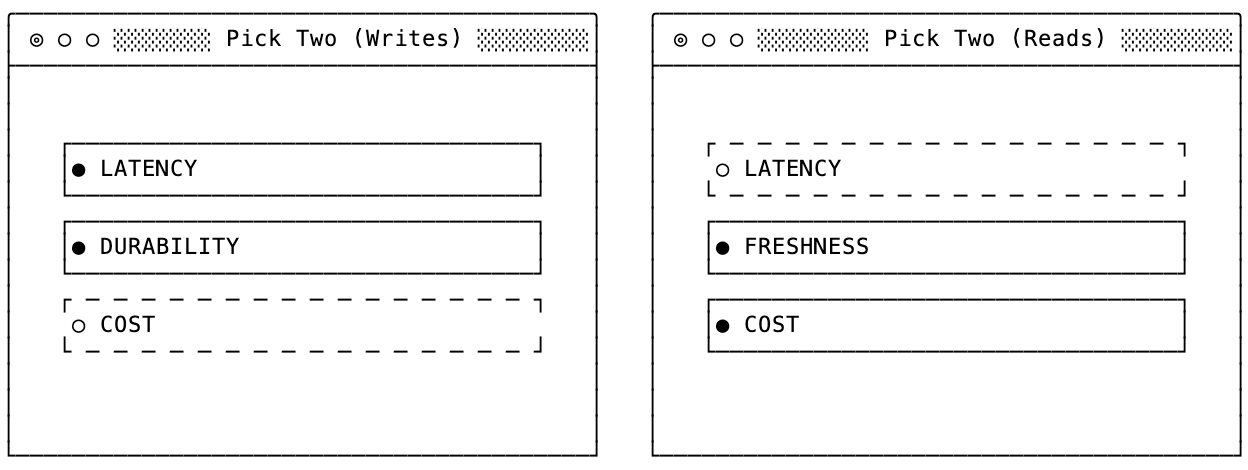
I’ve extended this framework when thinking about reads in distributed systems.
Instead of trading off durability, it’s how fresh the data you read that gets traded off. If you want low-latency queries on fresh data, you need to either actively replicate (e.g. quorum writes and reads) OR proactively maintain your cache by frequently polling a WAL/CDC stream for new data.
fsync()
I bet there’s more to be learned about latency, but I think this post has a good set of foundations for evaluating your system and performance. There’s also a full post that I need to write about techniques for designing your system to account for high latency storage mediums like S3… but that’s for another time.
As always, thanks for reading!